Follow these troubleshooting steps to see if the issue is resolved.
- Check the settings:
For HT-A9
- Restart the RF Channel: Select Setup → Advanced Settings → Speaker Settings → Wireless Speaker Settings → RF Channel to Off, then back to On.
Notes:
- We recommend you set the RF Channel to On. This allows the Sound Bar to automatically select the best channel for transmission, which makes it stronger against wireless interference.
- If the sound issue persists, try setting the RF Channel to Off.
- It may take a minute to reconnect after you change the RF Channel settings.
- The frequency setting is deleted after disconnecting the power cord. If you disconnect the power cord for some reason, switch the RF Channel from Off to On again.
- Set the Wireless Playback Quality to Priority on Stable Connection: Select Setup → Advanced Settings → Speaker Settings → Wireless Speaker Settings → Wireless Playback Quality, and set it to Priority on Stable Connection.
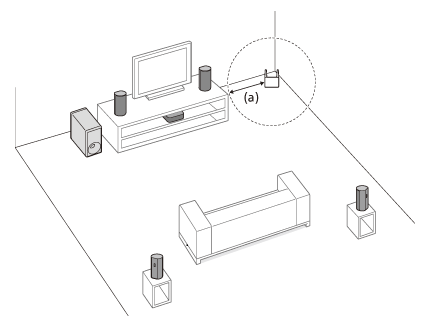
- Set the control box and speakers at a distance of at least 1.5 m (5 ft) from any wireless LAN router (a).
Note: The issue may be also improved by changing the wireless LAN router antenna’s direction or angle.
-
If two sides of the speaker are blocked by walls, the communication environment will be poor and the sound may be interrupted.
Follow one of these examples to move the speaker away from the wall, or turn it to make space between the walls.
Example 1: Move the speaker more than 5 cm (2 in) away from the side of the wall.

Example 2: If the speaker cannot move away from the side wall, move it more than 10 cm (4 in) away from the rear wall.
Example 3: If the speaker cannot move away from the corner of the wall, turn it about 45 degrees to make space from the wall.


- Check the control box installation condition and wireless environment:
- If a device that generates electromagnetic radiation is nearby, such as a wireless LAN device or microwave oven, move the speaker system away from that device. Turn off any other wireless LAN devices that are not in use to reduce interference, and then check to see if the issue is resolved.
Note: If the issue is resolved, change the network connection of the peripheral device from wireless LAN to wired LAN, if possible. - Do not install the control box too far back on a shelf. Install the control box in or on a shelf so that the front panel display is not hidden. Move the control box, change the direction of the control box, or install the control box far away from a TV.
- The control box and speakers are installed too far away from each other. Bring them closer together. If there are any obstacles between the control box and speakers, remove or move the control box and speakers away from those obstacles.
For BRAVIA Theatre Quad (HT-A9M2)
- Set the Wireless Channel to Auto: Open the Sony | BRAVIA Connect app, select Settings → Wireless Speaker Settings, and set the Wireless Channel to Auto.
Note: If the issue is not still resolved, change the setting to Group. - Set the Wireless Playback Quality to Priority on Stable Connection: Open the Sony | BRAVIA Connect app, select Settings → Wireless Speaker Settings, and set the Wireless Play back Quality to Priority on Stable Connection.
-
If two sides of the wireless speaker (optional rear speaker or subwoofer) are blocked by walls, the communication environment will be poor and the sound may be interrupted.
Follow one of these examples to move the speaker away from the wall, or turn it to make space between the walls.
Example 1: Move the speaker more than 5 cm (2 in) away from the side of the wall.
Example 2: If the speaker cannot move away from the side wall, move it more than 10 cm (4 in) away from the rear wall.
Example 3: If the speaker cannot move away from the corner of the wall, turn it about 45 degrees to make space from the wall.
- Check the control box installation condition and wireless environment:
- If a device that generates electromagnetic radiation is nearby, such as a wireless LAN device or microwave oven, move the speaker system away from that device. Turn off any other wireless LAN devices that are not in use to reduce interference, and then check to see if the issue is resolved.
Note: If the issue is resolved, change the network connection of the peripheral device from wireless LAN to wired LAN, if possible. - Do not install the control box too far back on a shelf. Install the control box in or on a shelf so that the front panel display is not hidden. Move the control box, change the direction of the control box, or install the control box far away from a TV.
- The control box and speakers are installed too far away from each other. Bring them closer together. If there are any obstacles between the control box and speakers, remove or move the control box and speakers away from those obstacles.
For BRAVIA Theatre Bar 9 (HT-A9000), BRAVIA Theatre Bar 8 (HT-A8000)
- Set the Wireless Channel to Auto: Open the Sony | BRAVIA Connect app, select Settings → Wireless Speaker Settings, and set the Wireless Channel to Auto.
Note: If the issue is not still resolved, change the setting to Group. - Set the Wireless Playback Quality to Priority on Stable Connection: Open the Sony | BRAVIA Connect app, select Settings → Wireless Speaker Settings, and set the Wireless Play back Quality to Priority on Stable Connection.
-
If two sides of the wireless speaker (optional rear speaker or subwoofer) are blocked by walls, the communication environment will be poor and the sound may be interrupted.
Follow one of these examples to move the speaker away from the wall, or turn it to make space between the walls.
Example 1: Move the speaker more than 5 cm (2 in) away from the side of the wall.
Example 2: If the speaker cannot move away from the side wall, move it more than 10 cm (4 in) away from the rear wall.
Example 3: If the speaker cannot move away from the corner of the wall, turn it about 45 degrees to make space from the wall.
- Check the bar speaker installation condition and wireless environment:
- The control box and speakers are installed too far away from each other. Bring them closer together.
- If there are any obstacles between the control box and speakers, remove or move the control box and speakers away from those obstacles.
For BRAVIA Theatre Bar 7 (HT-A7100), BRAVIA Theatre Trio (HT-A8)
- Set the Wireless Playback Quality to Priority on Stable Connection: Open the Sony | BRAVIA Connect app, select Settings → Wireless Speaker Settings, and set the Wireless Play back Quality to Priority on Stable Connection.
-
If two sides of the wireless speaker (optional rear speaker or subwoofer) are blocked by walls, the communication environment will be poor and the sound may be interrupted.
Follow one of these examples to move the speaker away from the wall, or turn it to make space between the walls.
Example 1: Move the speaker more than 5 cm (2 in) away from the side of the wall.
Example 2: If the speaker cannot move away from the side wall, move it more than 10 cm (4 in) away from the rear wall.
Example 3: If the speaker cannot move away from the corner of the wall, turn it about 45 degrees to make space from the wall.
- Check the bar speaker installation condition and wireless environment:
- The control box and speakers are installed too far away from each other. Bring them closer together.
- If there are any obstacles between the control box and speakers, remove or move the control box and speakers away from those obstacles.
- Check that the soundbar/home theater system and the connected devices are both updated to the latest version. For details on software update about soundbar or home theater system, refer to the product Help Guide, or go to Settings → Software update in the Sony | BRAVIA Connect app.
- Interference between the network connection and speaker connection may occur. Try one of the following:
- For BRAVIA Theatre Quad or HT-A9, change the wireless LAN connection of the control box and the router to a wired LAN connection.
- Switch the band of the wireless LAN router to 2.4 GHz, then set up the wireless network connection between the soundbar/home theater system and the wireless LAN router again using a 2.4 GHz band.
- Reset the soundbar or home theater system.
Note: For details on how to reset the soundbar or home theater system, refer to the How to reset the Soundbar or Home Theater System article.
Related article
Sound from the Sound Bar is interrupted while it is connected using a home network.


























